Security Recommendations for FPT.AI eKYC Integration
This document provides security guidelines and recommendations for customers integrating the FPT.AI eKYC solution, aiming to ensure data safety and protect against fraud risks.
1. Shared Security Responsibility between FPT.AI and Customers
To deliver the safest and most reliable identity verification (eKYC) process, security is a joint effort between the FPT.AI system and the Customer's System:
-
On the FPT.AI eKYC side: FPT.AI focuses on ensuring the accuracy of AI algorithms (facial recognition, document extraction). In particular, FPT.AI's Liveness Detection / Presentation Attack Detection (PAD) system has been certified under the international ISO/IEC 30107-3 Level 2 standard — the highest current level for Presentation Attack Detection. This standard evaluates the ability to detect physical spoofing methods in front of a camera sensor, including: printed photos, video replay attacks on digital devices, 3D masks, silicone masks, and other sophisticated props.
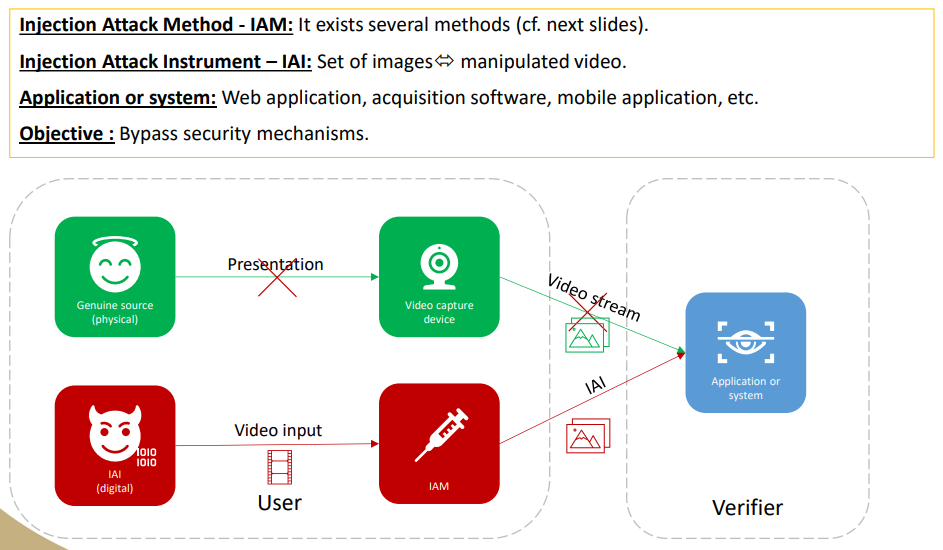
Customers can read more about this certification here: https://fptsmartcloud.com/fpt-ai-ekyc-dat-chung-nhan-sinh-trac-hoc-quoc-te-iso-iec-30107-3/ Important note: ISO/IEC 30107-3 is a standard for Presentation Attacks — attacks that occur in the physical world in front of a camera lens. This standard does not cover Injection Attacks — where an attacker injects fake data (deepfake videos, manipulated images, etc.) directly into the digital data stream through software manipulation tools (virtual cameras, rooted devices, direct API calls, etc.). To prevent Injection Attacks, additional protection layers from the device and application side are required (see the Customer side and Mobile SDK recommendations below).
Additionally, FPT.AI is responsible for ensuring absolute data security throughout the processing pipeline on the Backend system.
-
On the Customer side: For comprehensive security, Customers play a vital role in protecting the application runtime environment (Web / Mobile App) on the end user's device. This includes maintaining secure network connections and establishing barriers against external application tampering.
2. Security Recommendations for Web SDK
The Web browser environment has its own characteristics and cannot perform deep hardware integrity checks (such as Root/Jailbreak detection) like native Mobile applications. Therefore, to use the Web SDK securely, customers must adhere to the following:
-
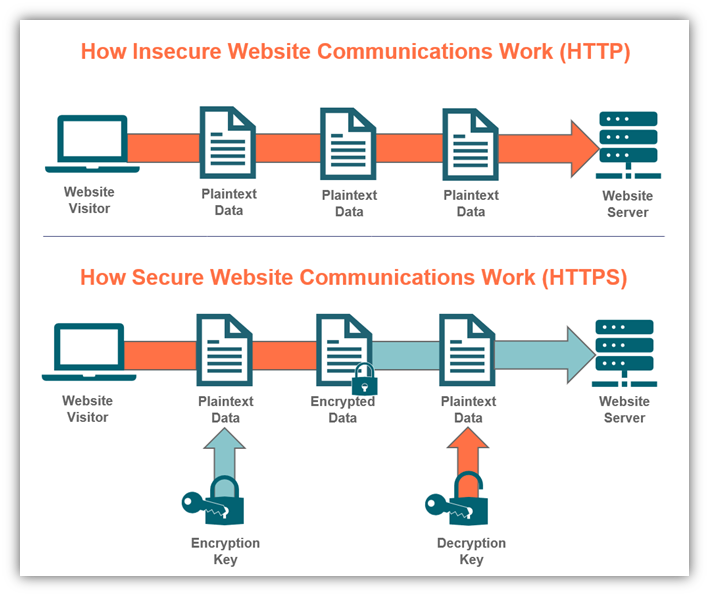
Mandatory Use of HTTPS (Secure Context):
- To prevent Injection Attacks, the FPT.AI Web SDK requires a secure connection.
- In the Production environment, the SDK will activate its protection mechanism and only work when the Customer's website runs on HTTPS. Unencrypted HTTP connections will be rejected.
- (Note: During initial integration, if Customers need to test on localhost or HTTP protocol, please contact FPT support to temporarily obtain Development Mode access).
-
Browser Compatibility:
- Encourage users to use the latest stable versions of Google Chrome or Apple Safari.
-
Web Application Hardening:
- Set up a strict Content Security Policy (CSP).
- Protect the system against Cross-Site Scripting (XSS) vulnerabilities.
3. Security Recommendations for Mobile SDK & Native App
When integrating eKYC on mobile application platforms, customers should fully leverage the security advantages of the Native environment:
-
Minimum OS Version Policy:
- Proactively block devices running outdated operating systems that contain numerous vulnerabilities and no longer receive security patches from the manufacturer.
- Minimum recommendation:
iOS 17+andAndroid 14+. - Important note: Operating system security standards change rapidly. Customers should regularly monitor security news to know which OS versions have been newly jailbroken/rooted, and proactively raise the minimum OS level to protect the system.
- UX optimization tip: To avoid disrupting the user experience on regular features, Customers should only check the OS version condition at the start of the eKYC / biometric authentication flow, rather than blocking users immediately upon opening the app.
-
Important Warning for WebView Usage (Hybrid Apps):
- If the Customer's Mobile app embeds the Web SDK inside a WebView component (instead of integrating the Native Mobile SDK directly), the application will not benefit from the hardware-level protection layers provided by the SDK.
- The WebView approach carries a higher risk of data tampering attacks. Therefore, if using this approach, customers must independently implement their own device integrity assessment measures.
-
Device Integrity Checks:
- The Mobile SDK supports detecting risky devices (such as Rooted/Jailbroken devices, devices running on Emulators/Simulators, devices with Debuggers attached, or those abusing Accessibility permissions). Customers can use these flags to decide whether to block or allow users to proceed.
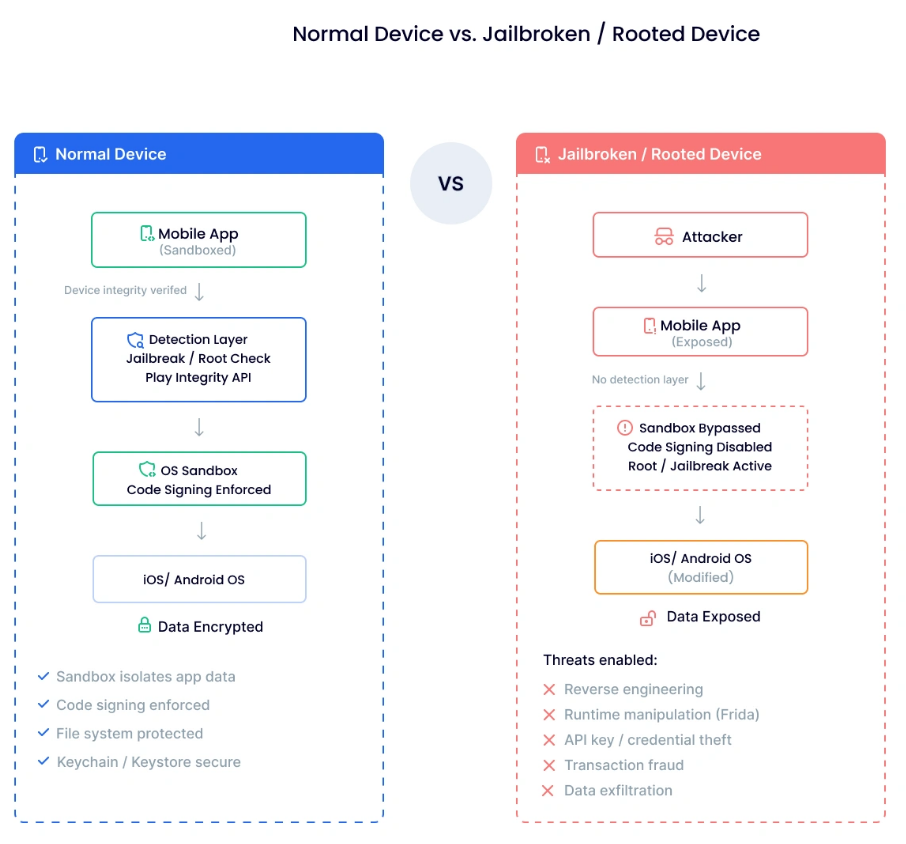
- The Mobile SDK supports detecting risky devices (such as Rooted/Jailbroken devices, devices running on Emulators/Simulators, devices with Debuggers attached, or those abusing Accessibility permissions). Customers can use these flags to decide whether to block or allow users to proceed.
-
Advanced App Hardening: To counter sophisticated eKYC bypass scenarios, mobile applications should additionally integrate:
- Anti-decompilation and memory integrity protection (App Shielding / RASP).
- Application integrity verification with Google Play Integrity (Android) and Apple App Attest (iOS).
- Certificate Pinning to protect API communication between the App and Backend.